% Percentage Calculator
Three of the most common percentage questions, answered as you type. Each mode shows the formula with your numbers.
Also known as: Percent of · Percent Increase · Percent Decrease · Percent Calculator · Percentage Calculators Hub · Calculate As a Percentage · Calculate Percentage
Loading calculator…
How to use the Percentage Calculator
- Enter your values in the fields above — the defaults show a worked example.
- The result updates instantly as you type; change any input to compare scenarios.
- Copy or share the result, or open a related calculator below.
How it's calculated
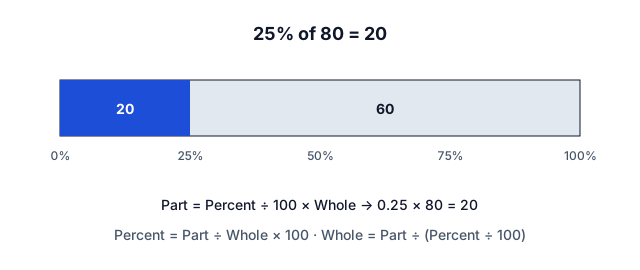
X% of Y = X ÷ 100 × Y. X as a percent of Y = X ÷ Y × 100. Change from A to B = (B − A) ÷ |A| × 100.
Frequently asked questions
How do I calculate a percentage of a number?
How do I find what percent one number is of another?
Is the Percentage Calculator free?
How accurate is the Percentage Calculator?
Can I use the Percentage Calculator on my phone or offline?
Read more about the Percentage Calculator
Three percentage questions
Almost every percentage problem is one of three: What is X% of Y? (part = X ÷ 100 × Y), X is what percent of Y? (percent = X ÷ Y × 100), and X is Y% of what? (whole = X ÷ (Y ÷ 100)). The calculator handles all three plus percentage change and adding or subtracting a percentage.
Read more
Examples
- 15% of 80 = 0.15 × 80 = 12 (see the working)
- 18 is what percent of 24? 18 ÷ 24 × 100 = 75%
- 30 is 20% of what? 30 ÷ 0.20 = 150
- 80 increased by 25% = 80 × 1.25 = 100
Mental math shortcuts
10% of a number is the number with the decimal point moved one place left (10% of 84 = 8.4). 5% is half of that, 20% is double, and 1% moves the decimal two places. X% of Y always equals Y% of X — so 8% of 50 is the same as 50% of 8, which is 4.
Percent vs percentage points
If an interest rate rises from 4% to 5%, it rose by 1 percentage point but by 25 percent. Mixing the two is one of the most common errors in news and finance. Use the percentage change calculator for relative changes.
Successive percentages
Percentages applied one after another multiply rather than add: a 20% discount followed by a further 10% off is 0.8 × 0.9 = 0.72, a 28% total discount — not 30%. Likewise, a 50% fall followed by a 50% rise leaves you 25% below where you started.
When to use the Percentage Calculator
Use the Percentage Calculator for what is X% of Y, X is what percent of Y, and percentage increase or decrease — all in one place. It is one of 73 free math calculators, and pairs well with the Percentage Change Calculator, Discount Calculator, Percent Error Calculator and Fraction Calculator.
Tips for accurate results
Check that your input uses the expected format (decimals, fractions or one value per line), keep full precision until the final step, and use the worked formula below the result to verify the answer by hand or for homework.
Sources and review
Sources:
Every calculator is checked against published reference values before release and re-reviewed when laws, rates or guidelines change. Read our methodology and editorial policy. Found a problem? Report it — we fix errors quickly.
Common percentage answers
- 5% of 50
- 5% of 100
- 5% of 200
- 5% of 500
- 5% of 1,000
- 10% of 50
- 10% of 100
- 10% of 200
- 10% of 500
- 10% of 1,000
- 15% of 50
- 15% of 100
- 15% of 200
- 15% of 500
- 15% of 1,000
- 20% of 50
- 20% of 100
- 20% of 200
- 20% of 500
- 20% of 1,000
- 25% of 50
- 25% of 100
- 25% of 200
- 25% of 500
- 25% of 1,000
- 30% of 50
- 30% of 100
- 30% of 200
- 30% of 500
- 30% of 1,000
- 50% of 50
- 50% of 100
- 50% of 200
- 50% of 500
- 50% of 1,000
- 75% of 50
- 75% of 100
- 75% of 200
- 75% of 500
- 75% of 1,000
More Math Calculators
Popular calculators
Results are estimates for information only. Calculations run privately in your browser.